Hello Designers!
Over the past year, our primary focus has been on enhancing the usability of svgia, specifically streamlining your daily workflow. We have introduced numerous convenient design tweaks, refined details, and added alternative shortcut modes to ensure the tool works seamlessly without interrupting your creative process. Our goal is to make creating and editing as intuitive as your natural thought process.
Additionally, stability remains a top priority. We have resolved dozens of bugs and exceptions in this release, making svgia more robust than ever. We are also glad to introduce a variety of new features and tools to further support your design workflow.
We have introduced a brand-new Brush Tool to bring more natural and expressive strokes into your vector workflow. It includes a wide variety of pen styles, ranging from realistic Bristle brushes to elegant Calligraphic brushes. The best part is that every stroke you paint remains a fully editable vector path. This means you can enjoy the freedom of freehand drawing, and later refine the shapes, tweak the curves, and adjust the details using our anchor editing tools, combining the feel of traditional media with the precision of vector editing.
- Spiral & Arc Tools: Quickly draw perfect spirals and arcs with dedicated, easy-to-use tools.
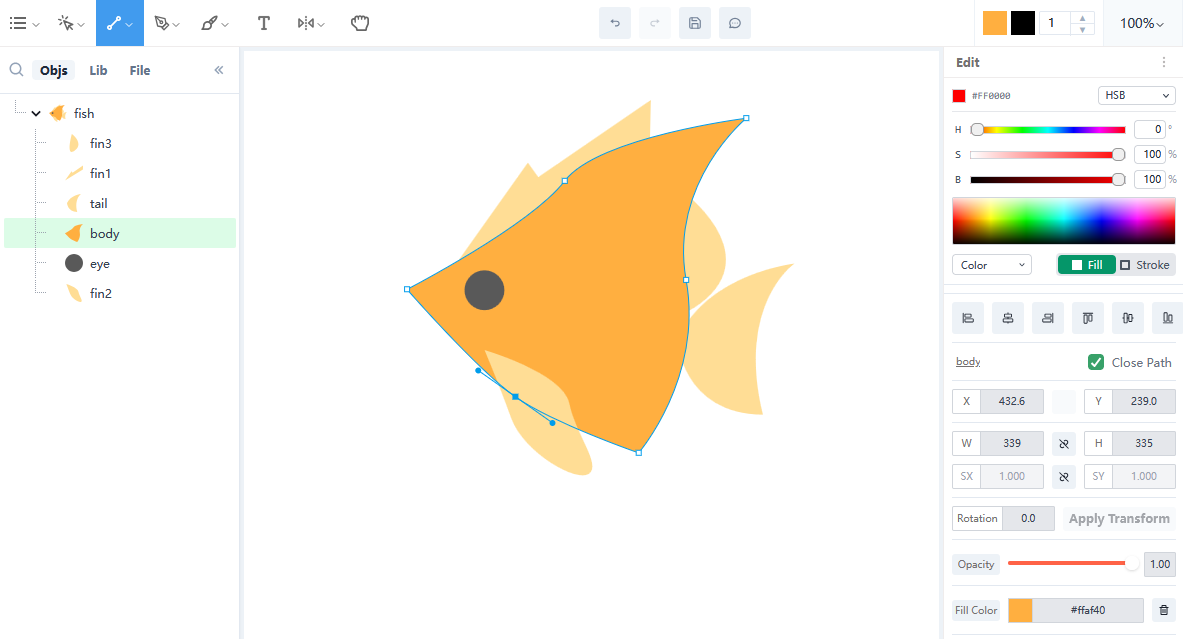
- Convert Point Tool (Shift + C): Instantly convert anchor points between smooth and corner types.
- Add / Delete Anchor Tools (+ / -): Dedicated tools to easily add or remove anchor points directly from your paths.
Advanced Typography and Text
- Multi-line Text Editing: A fully revamped text engine. You can now easily select, edit, and adjust the line height (leading) of multi-line text directly from the properties panel. You can also select sub-text to change its color and size without manually splitting objects.
- Google Fonts Integration: Browse and dynamically load thousands of Google Fonts directly into your designs.
- Text Outline Stroke: Add stylish outline strokes to your text, with full multi-line support.
Smart Clipboard and AI Generation
- Cross-App Compatibility: Enjoy seamless copy and pasting between svgia and other software. The clipboard now supports multiple formats and smartly recognizes content. If the target application does not support vector graphics, the app will automatically generate and paste a high-quality bitmap fallback.
- AI-Powered SVG Generation: Introducing our new Generative AI Chat. Simply describe the graphic or icon you need, and the AI will instantly generate a fully editable SVG image for you right on the canvas.
UI, Color, and Precision Enhancements
- HSB & RGB Color Pickers: Added advanced HSB and RGB color pickers in the Swatches panel for precise color selection.
- Fill & Stroke Toggle: Easily switch your color target between Fill and Stroke directly in the Color panel.
- Parameter Dialogs: Single-clicking a shape tool (like the Rectangle tool) now opens a parameter dialog, allowing you to input exact dimensions and properties before you start drawing.
- Collapsible Left Panel: The left panel can now be collapsed into a compact toolbar, giving you maximum canvas space.
- Document Thumbnails: The document grid view now displays thumbnail previews of your files for easier identification.
- In-App Feedback & Security: Added a built-in feedback system to easily send your thoughts to our team, along with a “Reset Password” functionality for user accounts.
Workflow and Experience Improvements
The Pen tool has been completely overhauled to match industry-standard workflows:
- Modifier Keys: Hold
Alt while using the Pen tool to temporarily switch to the Convert Point tool, or to add/delete anchor points on the fly. - Visual Guides: Added guide lines and visual hints when closing a path.
- Quick Actions: Press
Esc to instantly finish or cancel drawing a path. You can now also add or delete points directly by hovering over segments or curves.
Smarter Selection and Navigation
- Selection Modifiers: Hold
Shift to add objects to your selection, and Cmd/Ctrl to subtract from it. - Intuitive Curve Handles: When dragging Bezier curve handles, the system now auto-picks the most natural direction based on your mouse movement.
- Zoom-Aware Scrolling: Mouse wheel scrolling speed now intelligently adapts to your current zoom level for a smoother experience.
- Smart Centering: Imported SVGs, pasted raster images, and copied items now automatically center in your current view.
Path Operations and Export
- Join Paths: Added the
Ctrl + J (or Cmd + J) shortcut to quickly join selected paths, with improved logic for seamlessly connecting path segments. - Export Consistency: When exporting to SVG, text is now automatically converted to paths. This ensures your typography looks exactly the same on any device or software, preventing missing font issues.
Help and Documentation
- Added a Quick Start Guide and comprehensive Reference Documentation.
- Added interactive video tutorials for the Pen, Brush, Duplicate, and other tools. You can also hover over any tool in the selection menu to view a short explanatory video.
Bug Fixes
Text and Typography
- Fixed an issue where partially selected multi-line text would disappear when changing its color.
- Resolved fill and font color inconsistencies when exporting SVG files containing text.
- Fixed the text caret not displaying correctly when no text was inputted initially.
Drawing and Tools
- Fixed the Pen tool accidentally adding duplicate points when clicking the exact same spot.
- Resolved an issue where straight lines and curves could not be dragged properly.
- Fixed visual and state bugs when using the Mirror and Duplicate tools on Brush Paths.
- Prevented the accidental creation of tiny shapes when dragging less than 2 pixels.
Interface and Navigation
- The layer tree (left panel) now correctly updates when you drag and move objects on the canvas.
- Fixed a bug preventing users from entering isolation mode when clicking on non-path objects.
- Pressing
Esc to close a modal panel now correctly cancels the creation of the object. - Shortcuts no longer accidentally change the edit state when a modal dialog is open.
Import and Export
- Rounded rectangles (with
rx/ry properties) are now imported correctly from SVG files. - The app now gracefully handles and imports malformed SVG files without crashing.
- Fixed alignment precision issues to ensure objects snap perfectly into place.
Final Words
The svgia 2026.11 release mainly focuses on usability and creating a seamless workflow. While we may not have as many features as Adobe Illustrator just yet, the gap in user experience is steadily shrinking, and for certain tools, we believe the workflow is now even better. We have also made a lot of fixes to make the editor more robust and stable. The software is getting better every year.
We continue to listen to your feedback and build features that matter most to your creative process. Thank you for your ongoing support and trust in svgia.
As always, we welcome your suggestions and encourage you to share your feedback through our contact page or the new in-app feedback button.
Happy designing!
Paul is a senior software engineer with more than 20 years of experience.


 svgia.com